


Blog Post
21 July 2026 • InfiniDesk Team • 2 min read
What Does "Virtual Desktop" Mean on a Mac?
When you hear "virtual desktop" on macOS, you probably think of Apple's native Mission Control (Spaces). Mission Control lets you swipe, for example, between a Space with your browser app and a different Space with your email app. But macOS virtual desktops only organize one part of your workspace: your windows.
Here's the thing. On macOS, the word “desktop” can actually mean two different things:
- It can mean a workspace containing your windows, or
- It can mean the desktop background containing your files and icons.
Apple interprets "desktop" to mean your windows and app layouts, option 1.
InfiniDesk, however, is built to manage option 2: the files, folders, and icons on your desktop.
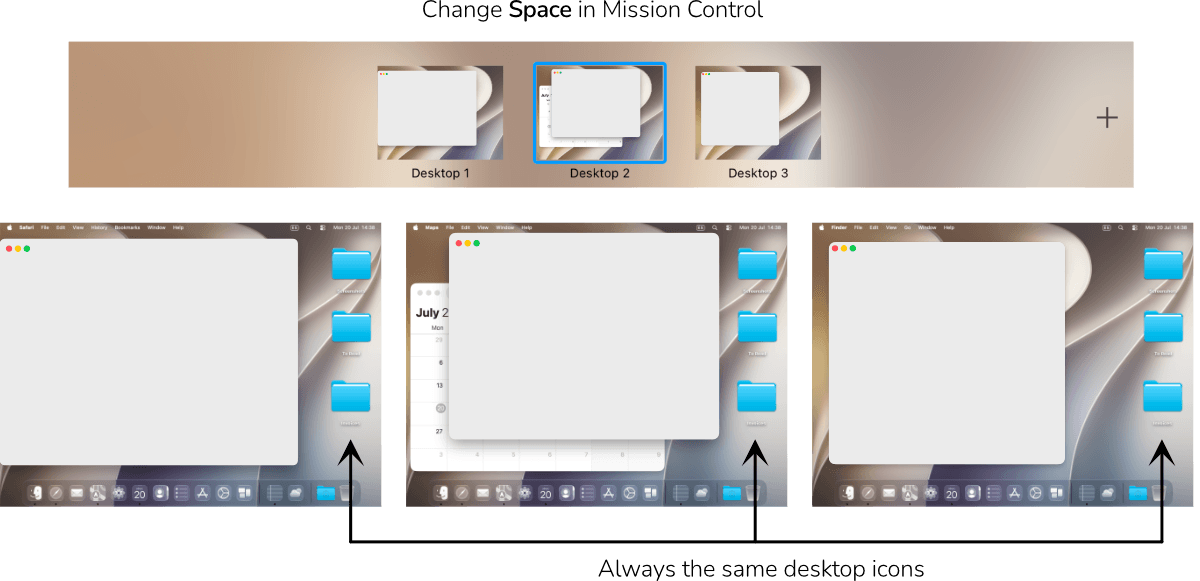
Mission Control Changes Windows, Not Desktop Files
Mission Control lets you change windows as you change Spaces, but the actual icons and files sitting on your desktop background remain exactly the same across all of your Spaces.
InfiniDesk Changes Desktop Files, Not Windows
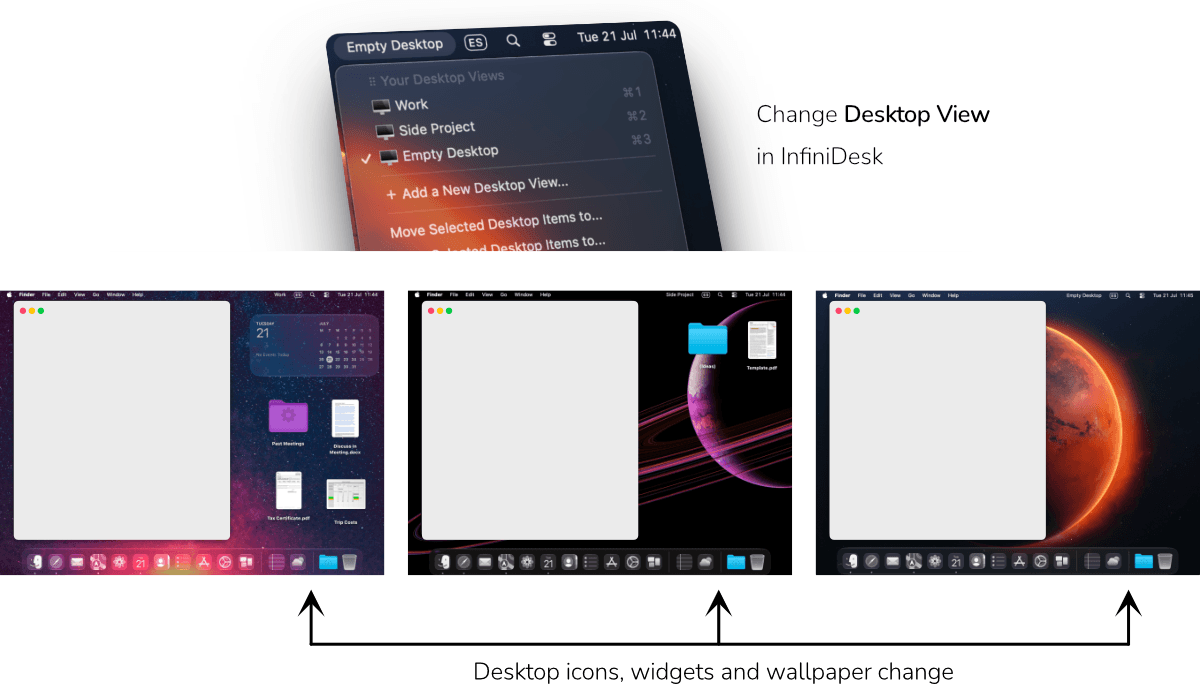
On the other hand, InfiniDesk lets you change the files, folders, and icons on your desktop, without affecting your open windows. It has "Desktop Views" instead of Spaces.
Using InfiniDesk and Mission Control Together
So Mission Control lets you change Space (window group displayed) and InfiniDesk lets you change the Desktop View (desktop background items displayed). They are complementary tools with different goals.
In fact, InfiniDesk can be partnered with Mission Control to take advantage of both tools. InfiniDesk has a feature called Follow Spaces Mode where you can assign a specific InfiniDesk file layout to a specific macOS Space. When you swipe to another Space, Mission Control changes your windows while InfiniDesk automatically changes your desktop files and icons. The result is the experience many users expect from a Mac virtual desktop manager: both your windows and your desktop contents change together, creating true project-based workspaces.
And, if you are not a fan of Spaces and don't use them, no problem: InfiniDesk can just be used in a single Space to change the desktop contents (called Classic Mode).
InfiniDesk is unusual in that it is not another desktop window manager. Rather, it is a desktop icon manager for Mac. Apple has never implemented the ability to have independent visual workspaces for files and folders on the Mac desktop. InfiniDesk fills that gap, making it especially useful for visual thinkers who use their desktop to lay out current projects.
As an important safety note, InfiniDesk works by toggling the visibility of files in your existing Mac Desktop folder, it does not make separate Desktop folders or do any other file system changes. This approach means that all of your desktop files always stay in your Desktop folder, safe, and never moved, copied or renamed.
Summary
Spaces manages your open windows, while InfiniDesk manages your desktop files and icons.
InfiniDesk can be used on its own, or it can be used in a complementary way with Spaces on Mac. When used as a complement to Spaces it can make each Space have its own desktop icon layout in addition to its own windows (giving the user the experience of "true" virtual desktops on Mac).
Version 3.22 for macOS ⠿ Released 10 September 2026
Free trial of 100 desktop switches included